I thought I’d do a a quick video experiment with Sony’s NEX-5n. Shot handheld on a cloudy day in Intelligent Auto mode with the toy camera filter selected. Shot in 1080p at 60 frames a second – edited an slowed down by half in Windows Live Movie Maker and exported as .wmv. I’m looking forward to getting a Hague mini motion-cam to use with this camera – should make for much smoother video. The soundtrack is A Farewell In The Evening Rain off my Further East album.
Tag: MoShang

I want to give you an audio tour of Taichung City which is my home here in Taiwan. To put you in the picture, Taichung is located roughly in the centre of Taiwan and it’s is the third largest city after Taipei and Kaohsiung. I’ve been living in Taichung since I arrived in Taiwan going on 7 years ago.
[podcast]http://moshang.net/MLO/SONGS_FOR_TAICHUNG_96.mp3[/podcast]
Download Songs for Taichung for US$ 1.33 (256kbps mp3 – highest quality):
[wp_eStore:product_id:9:end]
00:00 Part 1 [Construction]
We start at my home which is on the 4th floor of an apartment building in Dali City, itself a suburb of Taichung south of the city center. I’m on the balcony and capture the sound of construction going on next door. Our neighbor is a pretty unsightly parking lot, but if you look at satellite photos of my neighborhood on Google Earth, you’ll see that what is now the parking lot used to be a rice paddy – probably until about 5 years ago or so. That explains the water tower and small pond under my my window.
07:05 Part 2 [Cycling]
Let’s get out and about. I invite you to hop on my bicycle with me as we brave the traffic and head out into the streets of Taichung. We’re armed with a sound recorder to capture anything of interest, so let’s see what we can find. Ready? Here we go.
12:10 Part 3 [Recreation]
Our first stop is Taichung Park roughly at the center of the City. The idea is to get out of the noise and traffic for a bit. My nerves are a little frazzled from the trip here, and I’m also a little frustrated that thus far we haven’t found too many useful sounds. While, I ponder where I should take you next I beat this tattoo on some exercise equipment the City Government kindly provides in most of Taichung’s parks.
16:53 Part 4 [Golden Years]
A little further along Taichung Park we come across some old folks who have gathered in the shade of the trees to play Chinese chess and to chat the afternoon away. Let’s stay a while and eavesdrop.
21:12 Part 5 [Commerce]
Hunting sounds like this is hot work – let’s quickly pop into a 7-11 and get something to drink. By the way, if you ever come to Taiwan don’t make the mistake my friend did and use a 7-11 as a landmark – there are literally hundreds of them everywhere in Taichung and around Taiwan.
27:08 Part 6 [Market]
It’s time to visit one of Taichung’s popular night market streets, Yijhong Jia. Hey, it’s only 3PM, but already Yijhong Street is crowded – there’s no way we can ride through the throng. Better to get off and push the bike.
32:54 Part 7 [Teawhistle] from Made in Taiwan (2004)
After a visit to Yijhong Street, it’s time to head back home. To my first apartment in Taichung, as it turns out, where an old gentleman used to come round every night with a with a big kettle mounted on the back of his bicycle. You can hear steam escaping from it with a whistling sound
Running Time: 37:00
I do hope you’ve enjoyed this small trip around my city. I haven’t come close to showing you everything, so maybe we can do this again some time.
 This mix is made available under the following Creative Commons license: Attribution-Noncommercial 2.5 Taiwan (more details)
Subscribe:


I’ve just made a playlist of machinima(s) (what’s the plural?) of me performing in Second Life. Most recently SL resident Aiden Witrial has made a whole bunch of me at various shows. I want to thank Aiden and the other producers for taking the time to do this – it’s been a great help in getting word out about the tunes.
Categories
Mark Forman – photoshoot
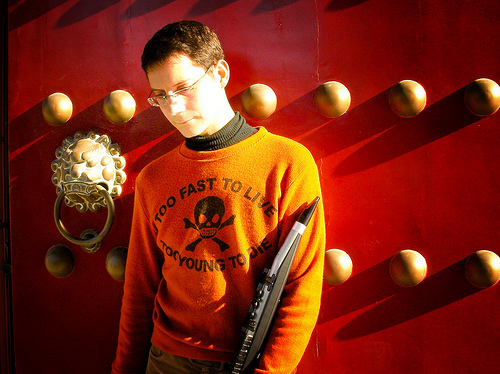
My friend Mark Forman (or bbluesman) offered to do a photoshoot for me, so we hit the Martyrs’ Shrine here in Taichung last Wednesday. I’m very pleased with the way it turned out – the photo above is my clear favorite. Have a look at the rest of the set here.
Mark obviously put quite a bit of work into it, and now I’m looking forward to another shoot, again with Mark behind the camera, but this time together with Chris Bailey. Hopefully we can get a couple of nice shots as promo material for Chris and my upcoming Suncake Lounge album.
Categories
EeePC 901 – got it!

After restraining myself for months now, I finally buckled and got myself an EeePC 901 (XP version) – it’s a tiny black beauty with a 1.6 GHz Intel Atom processor, 1GB Ram, and 2 SSDs (4GB for the OS and 8GB for program files and documents). I paid NT$16500 over here in Taiwan (got it at NOVA in Taichung), or just over US$540.
It shipped with a Chinese version of Windows XP which I’ve promptly replaced with an nLited version of XP Home in English. It would probably have made more sense to install XP on the 20GB Linux version of the 901, but I was told there wouldn’t be stock before August. Though the nLited XP is far smaller than the usual, I’ve decided to leave a 1.5GB page file active on the OS drive, leaving very little space to spare on that drive. I installed all the EeePC drivers from the supplied rescue CD without a hitch.
I believe there is still some clutter left over from the initial ASUS configuration, since XP wouldn’t allow me to format the drive with a working version of XP present on it – to get around this, I guess I could have installed my version of XP to the other SSD first, but with everything up and running now I just can’t be bothered. System restore, the other large space invader is disabled. I can always change this configuration if I run into problems, but so far so good.
I got the Eee with an eye to replacing the aging BenQ Joybook 5000U I’ve been using to do my live shows on and also for streaming shows into SL. Reason 4 installed without a hitch, along with my T-box USB midi interface and was soon doing tests with my WX-5 windcontroller. I was a little concerned with the performance until I remembered to optimize XP for music applications (following this guide). I’m happy to report that the little Eee is now performing on par with the BenQ machine it is replacing. Latency using the built-in souncard is at 42ms, and though that’s rather high, it’s the same as what I’ve become used to with the BenQ. Audio quality is perfectly acceptable, but I’ve opted to up the ante a little bit and have just ordered a Behringer UCA202 USB audio interface. There are a number of reasons for this choice:
a) it will be much less expensive to replace the US$30 UCA202 than to repair the audio jacks on the Eee should they start to give problems after multiple plug-ins and plug-outs (the jacks on the BenQ have become a little finicky with use).
b) the optional ASIO drivers for the UCA202 should theoretically give me much better performance in Reason, allowing me to reduce the previously mentioned latency figure.
c) the UCA202 is USB bus powered. A big consideration given the fact that I’ve run into problems on stage before when the wall-wart powered M-Audio USB Audiophile was unhappy with the amount of current it was receiving.
d) I did streaming tests with the ShoutCast plug-in for Winamp (essential for my SL live shows) and whilst the Eee had no problems encoding the audio (in fact barely registering CPU use), I wasn’t happy with the sound quality of the audio coming into the Eee via the built-in mic-in jack. I think I might have been overloading it with the output from my desktop’s M-Audio Fast Track Ultra interface. The UCA202 should fare better. That said, I’m more than happy with the audio quality of the Eee’s built-in mics when using SKYPE.
e) man, it’s cheap! Add the US$30 for the T-box and I’ve got a USB audio/midi solution for roughly US$60…
And thankfully YES, the Eee is more than happy to play my WMV encoded video/backtrack whilst running Reason. Keep in mind that my Reason requirements for performing live are not too high, never running more than a single combinator device. No doubt, you’d run into “computer too slow” messages pretty soon if you started to do more complex arrangements (confirmed when I tried to play back the included demo tracks).
So far I’ve been extremely impressed with this little machine – not to mention more than a little relieved that it will be able to handle the musical duties I bought it for! I’ll report back on latency once I have the UCA202 installed.
PS. as an added benefit, the Eee works surprisingly well as an E-book reader (if at 1.2kg slightly heavier than I expected) to replace the Mio Pocket PC GPS I’ve been using for this purpose ;^)

*** UCA202 UPDATE ***
The UCA202 is a true plug-an-play device and uses the generic USB audio CODEC. The ASIO drivers with the UCA202 were a bit of a catch 22 – they worked just fine, and on this machine I could reliably go down to 17ms latency in Reason without crackling. But the ASIO driver overwrites the USB audio CODEC for that USB port, meaning you can’t then use the UCA202 as the default audio device in XP. In other words, ASIO = no Winamp or Media Player via the UCA202. Since I need Media Player for my shows and Winamp for streaming, ASIO seems to be a no-go for me and I’m back to 42ms latency via the generic USB audio CODEC. Oh well, I’ve been playing like this for two years now, so at least I’m used to it. Besides, the other benefits I mentioned above for using the UCA 202 still count. I did my first Second Life show with the Eee last night – in this configuration, the Eee provides my live instrument sounds from Reason whilst streaming audio into SL via Winamps’s ShoutCast plug-in. It performed flawlessly.