With a break in my schedule after the delivery of the Koxinga masters, I made use of the opportunity to move from the 32bit to 64bit version of Windows 7. This PC has had 6GB ram from the start, but I could never make use of it in the 32bit OS. I’ve moved to the latest version of Cakewalk’s Sonar X1, also running in its native 64bit version. I was worried that I wouldn’t be able to connect Reason (32bit only at the moment) to Sonar X1 64bit, but then I came accross the aptly named Rewire VST. It’s working like a charm for me.
To stress test the new setup and to get up to speed with Sonar X1, I’ve been doing lots of mixing on my Aerobium side-project – more on that later.
So far, so good… the most annoying niggle at this stage is that I can’t get my Lexmark printer installed. I may have to get another ;^/
I meant to share this long ago, but never got around to it. Here’s a video I made to illustrate my working method for a presentation I did at a Creative Commons workshop entitled “Asia and the Commons” in Taipei (Taiwan) in January 2008. My presentation was called “Jamming With Machines” and this vid. was not intended as tutorial, but just to give some idea of how I go about building tracks. It’s a little outdated now, but someone might find it of interest ;^)
After restraining myself for months now, I finally buckled and got myself an EeePC 901 (XP version) – it’s a tiny black beauty with a 1.6 GHz Intel Atom processor, 1GB Ram, and 2 SSDs (4GB for the OS and 8GB for program files and documents). I paid NT$16500 over here in Taiwan (got it at NOVA in Taichung), or just over US$540.
It shipped with a Chinese version of Windows XP which I’ve promptly replaced with an nLited version of XP Home in English. It would probably have made more sense to install XP on the 20GB Linux version of the 901, but I was told there wouldn’t be stock before August. Though the nLited XP is far smaller than the usual, I’ve decided to leave a 1.5GB page file active on the OS drive, leaving very little space to spare on that drive. I installed all the EeePC drivers from the supplied rescue CD without a hitch.
I believe there is still some clutter left over from the initial ASUS configuration, since XP wouldn’t allow me to format the drive with a working version of XP present on it – to get around this, I guess I could have installed my version of XP to the other SSD first, but with everything up and running now I just can’t be bothered. System restore, the other large space invader is disabled. I can always change this configuration if I run into problems, but so far so good.
I got the Eee with an eye to replacing the aging BenQ Joybook 5000U I’ve been using to do my live shows on and also for streaming shows into SL. Reason 4 installed without a hitch, along with my T-box USB midi interface and was soon doing tests with my WX-5 windcontroller. I was a little concerned with the performance until I remembered to optimize XP for music applications (following this guide). I’m happy to report that the little Eee is now performing on par with the BenQ machine it is replacing. Latency using the built-in souncard is at 42ms, and though that’s rather high, it’s the same as what I’ve become used to with the BenQ. Audio quality is perfectly acceptable, but I’ve opted to up the ante a little bit and have just ordered a Behringer UCA202 USB audio interface. There are a number of reasons for this choice:
a) it will be much less expensive to replace the US$30 UCA202 than to repair the audio jacks on the Eee should they start to give problems after multiple plug-ins and plug-outs (the jacks on the BenQ have become a little finicky with use).
b) the optional ASIO drivers for the UCA202 should theoretically give me much better performance in Reason, allowing me to reduce the previously mentioned latency figure.
c) the UCA202 is USB bus powered. A big consideration given the fact that I’ve run into problems on stage before when the wall-wart powered M-Audio USB Audiophile was unhappy with the amount of current it was receiving.
d) I did streaming tests with the ShoutCast plug-in for Winamp (essential for my SL live shows) and whilst the Eee had no problems encoding the audio (in fact barely registering CPU use), I wasn’t happy with the sound quality of the audio coming into the Eee via the built-in mic-in jack. I think I might have been overloading it with the output from my desktop’s M-Audio Fast Track Ultra interface. The UCA202 should fare better. That said, I’m more than happy with the audio quality of the Eee’s built-in mics when using SKYPE.
e) man, it’s cheap! Add the US$30 for the T-box and I’ve got a USB audio/midi solution for roughly US$60…
And thankfully YES, the Eee is more than happy to play my WMV encoded video/backtrack whilst running Reason. Keep in mind that my Reason requirements for performing live are not too high, never running more than a single combinator device. No doubt, you’d run into “computer too slow” messages pretty soon if you started to do more complex arrangements (confirmed when I tried to play back the included demo tracks).
So far I’ve been extremely impressed with this little machine – not to mention more than a little relieved that it will be able to handle the musical duties I bought it for! I’ll report back on latency once I have the UCA202 installed.
PS. as an added benefit, the Eee works surprisingly well as an E-book reader (if at 1.2kg slightly heavier than I expected) to replace the Mio Pocket PC GPS I’ve been using for this purpose ;^)
EeePC 901 as E-book reader
*** UCA202 UPDATE ***
The UCA202 is a true plug-an-play device and uses the generic USB audio CODEC. The ASIO drivers with the UCA202 were a bit of a catch 22 – they worked just fine, and on this machine I could reliably go down to 17ms latency in Reason without crackling. But the ASIO driver overwrites the USB audio CODEC for that USB port, meaning you can’t then use the UCA202 as the default audio device in XP. In other words, ASIO = no Winamp or Media Player via the UCA202. Since I need Media Player for my shows and Winamp for streaming, ASIO seems to be a no-go for me and I’m back to 42ms latency via the generic USB audio CODEC. Oh well, I’ve been playing like this for two years now, so at least I’m used to it. Besides, the other benefits I mentioned above for using the UCA 202 still count. I did my first Second Life show with the Eee last night – in this configuration, the Eee provides my live instrument sounds from Reason whilst streaming audio into SL via Winamps’s ShoutCast plug-in. It performed flawlessly.
Em. and I were in Taipei on Saturday. At the invitation of Chuang Tyng-Ruey of the Academia Sinica and Creative Commons Taiwan, I did my “Jamming with Machines” presentation at the OpenTechSummitTaiwan2008 and also did a small performance later with PigHeadSkin, the first musician to release a Creative Commons album here in Taiwan.
The venue was ASUS Headquarters, and being a huge fan of the EeePC, I felt a bit like a kid in a candy store. I’ve been looking at one of these mini-marvels for a long time now as a super-portable replacement for the current Ben-Q laptop I’ve been doing my live performances on. Essentially, the EeePC will have to be able to run one instance of a combinator in Propellerhead’s Reason, whilst playing a .wmv with my backtrack and backround visuals.
Though the EeePC is not necessarily intended for doing heavy duty multi-media tasks, I somehow feel confident that it will be up to it. Especially since the new EeePC 900‘s processor is capable of running at full 900MHz capacity with no fixed underclocking as was the case with the EeePC 700 / 701. It didn’t want to do too much fishing about future versions of the EeePC and can’t confirm any of the rumours of an Intel Atom based version or 10″ version coming soon.
What I do know for a fact, though, is that there is a later version in the works (ie. later than the just released EeePC 900) and that this version will come bundled with a couple of my tracks. HOW EXCITING IS THAT!!!
Honestly, ASUS have gotten it so right with the EeePC that I’m over the moon to be associated with it even in the smallest way. Deservedly or not, there’s long been this idea (even amongst the locals) that Taiwan is best at making copies of things rather than being innovative. Hopefully the slew of EeePC competitors that have been announced since its release will go some ways towards putting that notion to rest.
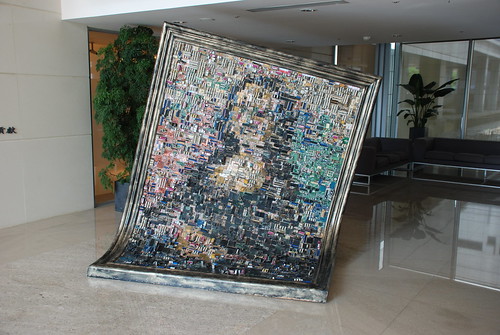
On the Amarok blog Seb Ruiz posted this pic of the very cool Mona Lisa in the lobby of ASUS HQ – made entirely of motherboard components.

 This mix is made available under the following Creative Commons license: Attribution-Noncommercial 3.0 Taiwan (more details)